Build #1.0.1 (d08aa8d5)
- Licensing Improvements
- Crash Fixes
- PreSculpt Solve Map Association
- Speed Optimization Sculpt Push
- Clip Exporting & Attaching
Fixes, Updates & New Features in Ozone for Maya 1.0.1:
Below you’ll find a list of fixes, updates and new features included in the point with the incremental version update of Ozone for Maya 1.0.1.
- 🆕New Features
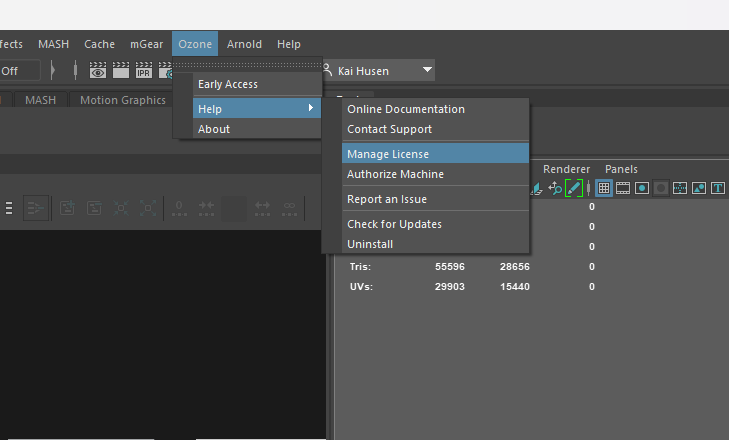
- Added ‘Manage License’ & ‘Authorize Machine’ to the Maya menu bar.
- 🚀Optimizations
- Removed pre sculpt solve ‘.weight’ map associated with morph setting to all 1.0 for all vertices. The solve_sculpt does all its needed weight map manipulation internally now, so it doesn’t matter whether ‘.weight’ has any values before hand or not.
- Optimizations: Pushing a sculpt is significantly faster. Depending on the asset pushing a sculpt is close to 90% faster. Added support for “early-out” handling. In the case of this (ie. a single point on 1 of 9 meshes): it meant 8 of the meshes could escape consideration early.
- Utils/actor_management.py: changed _copy_values for ozone.VectorArray3f to use .copy() instead of making a Python list of ozone.Vector3f points. This shaves off another ~0.8s, and the undo/redo for PushSculpt still works as expected… so: that’s pretty cool.
- ⚠️General Awareness
- ⚠️ Added id type filtering for animation scopes, id type = 16
- ⚠️ OzoneClipNode.h: overrode schedulingType to make sure it’s getting set to kParallel. kParallel used to not be the default.
- 🐛Bugs
- ✅ BUG: [Maya 2023] Authorize machine doesn’t re-direct a user to enter their license info
- ✅ BUG: [Maya 2023] Crash occurs when a user creates a new scene, filters by -w, & re-selects a
Known Issues:
- ⛔Critical
- Runtime Error occurs when a user accesses the paint brush tool settings
- CRASH: [Maya 2023] Runtime Error occurs when a user accesses the paint brush tool settings
- CRASH: [Maya 2023] Crash occurs when a user selects new scene & mungs an AVAR on the remnant hierarchy list
- ⚠️General Awareness
- INFO: [Maya 2023] Pushing a sculpt duplicates the mesh rendering an awkward AVAR munging experience.
- INFO: [Maya 2023] Namespace gets ignored during import.
- INFO: [Maya 2023] Creating a rig from the Rig Library does not build the Ozone hierarchy list.
- INFO: [Maya 2023] Maya hotkey buttons don’t function when painting.
- 🐛Bugs
- BUG: [Maya 2023] Error occurs when re-importing a clip that’s referenced
- BUG: [Maya 2023] Right clicking on clip in clip list should open file location
- BUG: [Maya 2023] Mirroring Weights is not currently working and will be fixed in the next release.
- BUG: [Maya 2023] After undoing every action painting will no longer update live
- BUG: [Maya 2023] Weight Munging still updating values after MouseUp
- BUG: [Maya 2023] Creating a rig from the Rig Library does not build the Ozone hierarchy list